

Apple Watch · Games · Action · AR · KIDA Studios
Down The Drone for Apple Watch — The Drone Radar, on Your Wrist
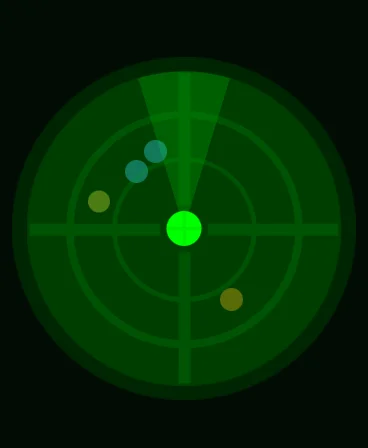
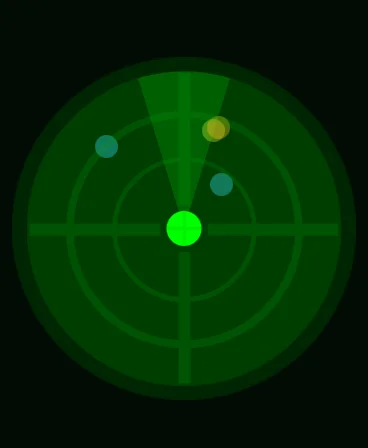
The watchOS app shows the same green radar as the iPhone game: you in the centre, the drones as blips around you. Free with the iPhone download, no ads, no purchases.
Apple Watch

What Down The Drone does on Apple Watch
The watchOS version specifically — what it is built around and what it does differently from the other versions.
The AR shooting happens on the iPhone — a watch has no camera to see your room with. What the Apple Watch app brings is the radar: the green scope from the corner of the iPhone screen, full size on your wrist, with you at the centre and every drone shown as a blip around you.
In an AR game the threats are all around you, not just in front of the screen. A glance at the wrist tells you which way to turn before a drone closes in from behind.
The watch app is included with the iPhone game. There is nothing separate to buy; install Down The Drone on the iPhone and add the watch app from the Watch app on your iPhone.
On Apple Watch you get
- Drone radar on your wrist. You at the centre, drones as blips around you.
- Sweep cone. Shows the direction you are facing, so you know which way to turn.
- Same game, second screen. The radar from the iPhone HUD, readable at a glance.
- Included, not extra. Ships with the free iPhone download; no separate purchase.
- No ads, no in-app purchases. The same as the iPhone game.
How to get Down The Drone on Apple Watch
Three steps from the store to your first result on watchOS.
- 1
Install Down The Drone on your iPhone
The watch app comes with the iPhone download from the App Store.
- 2
Add it on the Watch
Open the Watch app on iPhone, find Down The Drone under Available Apps, and tap Install — or let automatic app install do it.
- 3
Play, and check your wrist
Start a game on the iPhone and glance at the watch to see where the drones are around you.
Apple Watch requirements
What the watchOS version needs before you install it.
| Requirement | Detail |
|---|---|
| watchOS | watchOS 10.0 or later |
| iPhone | The game itself runs on an iPhone with iOS 17.0 or later (iPhone XS / XR and newer) |
| Price | Included with the free iPhone game. No ads and no in-app purchases |
| Rating | 12+ |
| Connection | Standard watch-to-iPhone pairing; no internet required |
The watch shows the radar; the AR view, aiming and shooting all happen on the iPhone.
Down The Drone on other platforms
The same app, on the devices you already own.
FAQ
Questions people ask before installing on watchOS.
Can I play Down The Drone on the Apple Watch alone?
No. The AR game needs the iPhone’s camera to see your room. The Apple Watch app is the radar: it shows where the drones are around you.
Is the watch app a separate purchase?
No. It is included with Down The Drone on iPhone, which is free on the App Store with no ads and no in-app purchases.
Which watchOS version is required?
watchOS 10.0 or later, with the game on an iPhone running iOS 17.0 or later.
What does the radar show?
You at the centre, a sweep cone for the direction you are facing, and each drone as a blip, so you can tell which way to turn before one reaches you.
Get Down The Drone for Apple Watch
Drone radar for the AR shooter — built by KIDA Studios.