
Heart Rate Zones App: Best Options for iPhone and Apple Watch (2026)
Heart-rate zones turn a workout from “that felt hard” into something measurable. The apps below all read Apple Health, and they differ mainly in how much structure they impose on top.
Up front: 70 BPM is our app, and it is not a zone-training app. It shows heart rate against your calendar, not time-in-zone against your workouts. If zone training is what you need, the apps below do it properly and this article recommends them accordingly.
What heart-rate zones actually are
Zones divide your heart-rate range into bands, usually five, each representing a different training intensity — from easy aerobic work at the bottom to maximal effort at the top. The point is that different adaptations happen in different bands, so knowing how long you spent in each is more useful than knowing your average.
Zone 2 gets disproportionate attention because it is the band most people under-use: easy enough to hold a conversation, which feels too easy to be productive, and which is exactly why it gets skipped.
Where zones sit against a normal resting heart rate
Zones are usually built as a percentage of your maximum heart rate, but the number people actually check day to day is resting heart rate — what your heart does at rest, not during a workout. The American Heart Association and Mayo Clinic put normal resting heart rate at 60 to 100 BPM for essentially everyone aged 10 and older; that range does not narrow for older adults, and very fit athletes can sit well below it, sometimes near 40. What does differ is the average: adult men typically average around 71 BPM at rest, adult women around 80, per Cleveland Clinic — a difference in average, not in what counts as normal.
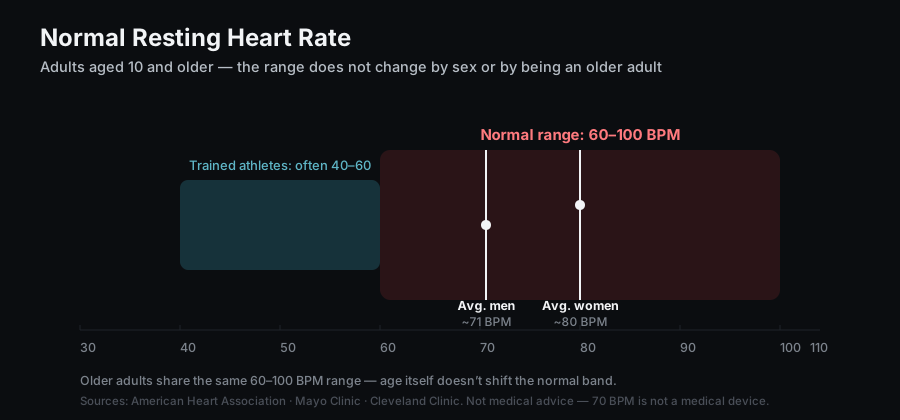
Sources: American Heart Association, Mayo Clinic, Cleveland Clinic. Not medical advice — 70 BPM is not a medical device.
The apps
Zones for Training — the all-rounder
Free, 4.8 stars from over 19,000 ratings, iOS 17.6 or later, iPhone, iPad and Apple Watch. Reads workout data from Apple Health and visualises intensity, and is the most highly rated option in this category by a wide margin. Best for: most people who want zone analysis without building a training system around it.
Zone 2: Heart Rate Training — the single-purpose one
Free, 4.6 stars from 240 ratings, iOS 17 or later. Tracks how much of your weekly workout time falls in the zone 2 range specifically. Best for: anyone following a polarised or 80/20 plan who wants one number checked each week rather than a full dashboard. Limitation: a small ratings base, and deliberately narrow.
HeartWatch — the paid, heart-focused option
$8.99 once, 4.7 stars from over 13,600 ratings, iOS 11 or later. Includes a Watch workout app with custom alerts to hold you in a target zone, which is the feature that separates it — it intervenes during the session rather than reporting afterwards. Best for: people who want in-workout zone alerts and prefer paying once. Limitation: no iPad app.
Heart Analyzer — the analytics dashboard
Free with an optional subscription, 4.7 stars from nearly 22,000 ratings, iOS 17.5 or later. Broad heart analytics over Apple Health data with charts, reports and widgets. Best for: people who want depth across all heart data, not just training. Limitation: the deeper analysis sits behind a subscription, and it is a heart dashboard rather than a zone trainer specifically.
Comparison
| App | Focus | Price | Platforms | Rating |
|---|---|---|---|---|
| Zones for Training | Zone analysis, all-round | Free | iPhone, iPad, Watch (17.6+) | 4.8 (19,138) |
| Zone 2 | Weekly zone 2 time | Free | iPhone, iPad, Watch (17+) | 4.6 (240) |
| HeartWatch | In-workout zone alerts | $8.99 once | iPhone, Watch (11+) | 4.7 (13,624) |
| Heart Analyzer | Heart analytics dashboard | Free + sub | iPhone, iPad, Watch (17.5+) | 4.7 (21,996) |
Figures from each app’s App Store listing, 26 August 2026. Ratings and pricing change — check the listing before buying.
Which one
- Just want zones to work: Zones for Training.
- Following an 80/20 plan: Zone 2.
- Want alerts during the workout: HeartWatch.
- Want everything your heart data can tell you: Heart Analyzer.
- Want to know why your resting rate moved, not how you trained: that is a different question — see heart rate analysis apps for Apple Health.
FAQ
What are the five heart rate zones?
Zones divide your heart-rate range into bands of increasing intensity, conventionally five: very light, light aerobic, aerobic, threshold, and maximal. The exact percentages vary by method — some are calculated from maximum heart rate, others from heart-rate reserve or lactate threshold — so two apps can label the same effort differently.
What is the best free heart rate zones app for iPhone?
Zones for Training is free and the highest rated in this category, at 4.8 stars from over 19,000 ratings. Zone 2 is also free if you only care about weekly time in the aerobic band.
Does Apple Watch show heart rate zones natively?
Recent versions of watchOS show zones during workouts in the built-in Workout app. Third-party apps add history, weekly totals, custom zone definitions and in-workout alerts, which is what most people install them for.
Does 70 BPM track heart rate zones?
No. 70 BPM shows your heart rate against your calendar events, not time-in-zone against workouts. For zone training use one of the apps above; 70 BPM answers a different question, which is what in your day a reading corresponded to.
70 BPM shows the heart rate Apple Health already holds against your calendar. Free, on device, no account.
See the 70 BPM heart rate calendar app ›